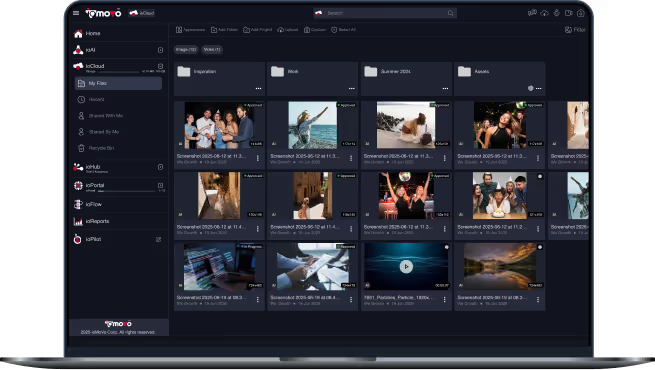
Ask Your Content Anything, and Get Work Done

ioPilot is the AI assistant built into ioMoVo. Type, dictate or talk to it in real time, and it finds, summarizes
and acts on files in ioCloud or any connected drive you choose, all in plain language. You decide which tools it can use, which
model answers and which playbooks guide it.

Your own model or ours
Respects existing permissions
Every action logged
ISO 27001 and SOC 2 Type II
Why Teams Choose ioPilot

Ask your way
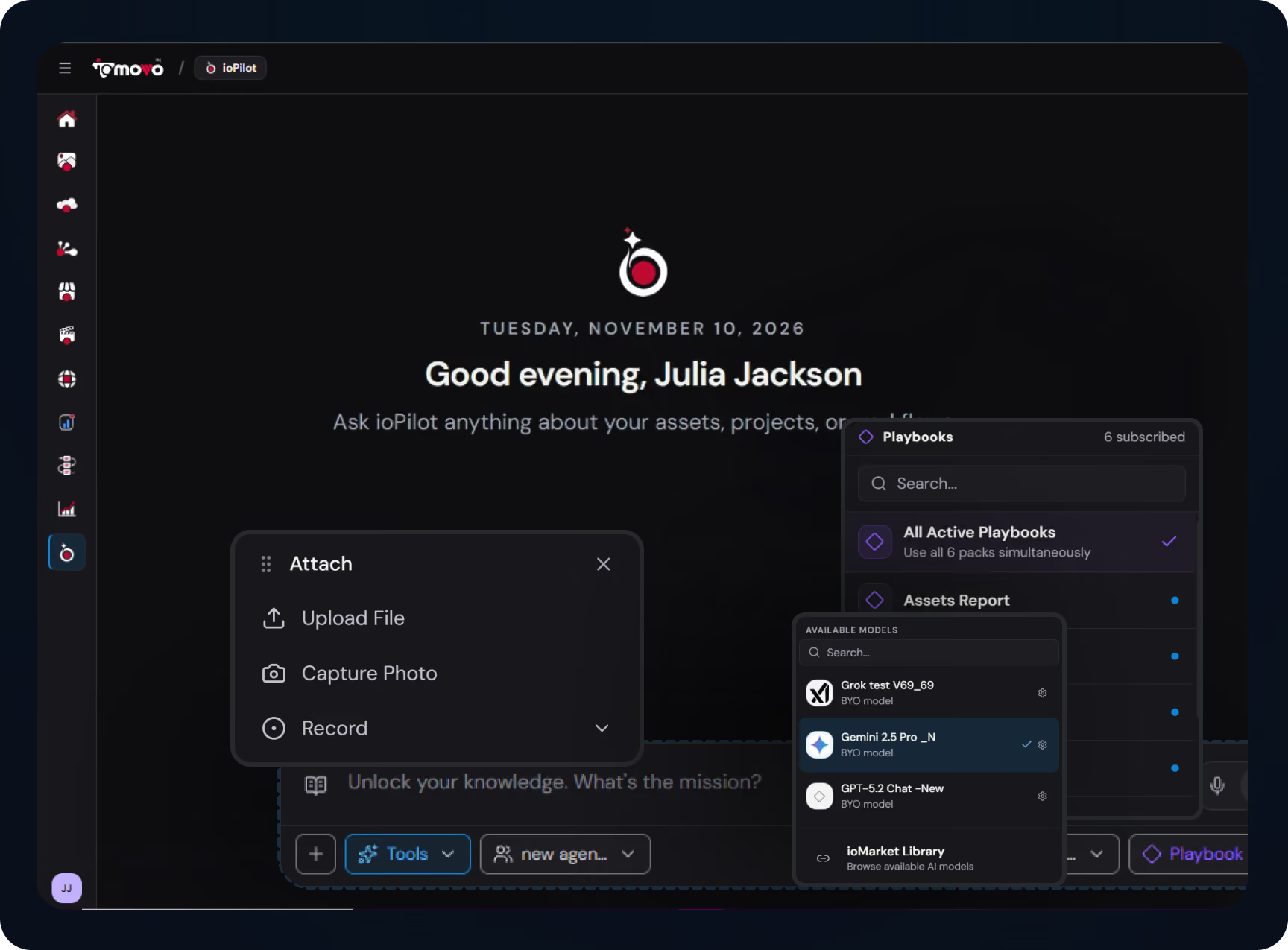
Type, dictate or talk in real time, and attach or record files right in the chat.

Pick the drive, then ask
Search ioCloud or any connected drive in plain language. The chat bar always shows where ioPilot is looking.

Grounded in your actual content
Answers come from your own files.

Respects existing permissions
Permissions are checked the moment someone asks, so ioPilot only works with files they can already open.

Your model, your boundary
Use your own keys, run a self hosted model, or use ours, in the cloud, on premise or fully air gapped.
That's what separates ioPilot from most AI search tools: it is part of a governed platform, not an add on.
What ioPilot Does
Talk to your library the way you talk to a colleague. There's no query syntax to learn: describe what you need, and ioPilot works out where to look and what to do.
Type or Dictate
Type a question, tap the microphone to dictate it, or switch to real time voice and have a conversation. Ask for last spring's drone shots of the harbor while your hands stay on the timeline.
Attach or capture with the + button
Upload a file, capture a photo, or record video, audio or your screen, and ask ioPilot about it right away. What you capture lands in ioMoVo, not on your desktop.
Start from a saved prompt
The Prompt Catalog holds ready made prompts grouped by job: asset management, analytics and reports, workflows and more. Find duplicates, auto tag recent uploads or build a storage report in one click, then save and share your own.
Build better prompts visually
Drag blocks such as role, task, context, examples, output format and guardrails onto a canvas, watch the prompt take shape in a live preview, and test it before you save it.
Summaries and brand checks
Get structured summaries of long videos, meetings and documents, and find assets by logo, scene or emotion, including images where your logo is used incorrectly.

Built for Teams Drowning in Content
Teams need AI search that works with the storage and governance they already have, not another migration project.
What we hear from teams that need natural language search across enterprise content:

Finding one file means opening a different tool for SharePoint, Google Drive, Box, Amazon S3 and every on premise share.
Most AI search tools are added on after the fact, outside the governance you already rely on.
General AI assistants answer from public training data, not from your own content.
Building your own retrieval system takes months and rarely covers video, audio and images.
Compliance teams block AI tools that send content to a provider they don't control.
Most AI search products want your content moved into their platform first.

How ioPilot solves it:
Pick any connected drive and ask in plain language. The chat bar shows exactly where ioPilot is looking.
ioPilot is built into the ioMoVo platform, so there is nothing to bolt on and nothing to rebuild.
Answers come from your own files, and ioPilot only works with what each person is allowed to open.
Indexing agents tag video, audio, images and documents as files arrive, so there is no retrieval project to build.
Bring your own model, or run a self hosted one through an ioAI connection, so prompts and files stay inside the boundary you set.
No migration required: ioHub connects the storage you already run, and ioPilot works on files right where they live.
Where Teams Use ioPilot

Sales and revenue teams
“Summarize last quarter’s recorded customer calls and list the top objections.” ioPilot transcribes, indexes and returns a structured summary of the key topics.
Regulatory and compliance teams
“Find every policy document that mentions the updated retention rule.” ioPilot searches the drive you pick, links each answer to its file, and logs the request for audit.
Media and video teams
“Find all Q3 videos featuring the CEO.” ioPilot searches the drive you pick and returns matching clips with timestamps.
Legal and contract teams
“Find master services agreements with indemnification language signed since 2024.” ioPilot searches your contract folders in plain language and shows you the files.
Marketing and brand teams
“Show me images with our logo placed incorrectly.” ioPilot runs brand compliance detection across your image library.
Core ioPilot Capabilities
Tools you control
More than 35+ built in tools cover search, reading documents, version history, activity logs, reports, canvas, web search, and generating images, video or PDFs. Switch any tool on or off from the chat bar, or add your own in ioStudio.
Choose the agent
Pick the agent that answers. The ioPilot Agent handles everyday work, and admins tune how it behaves in ioStudio.
Bring your own model
Connect your own keys for Claude, Gemini, ChatGPT or Grok, run a self hosted model, or use ioMoVo's models. Your own keys lower the AI credits ioPilot uses.
Playbooks that know your work
Playbooks teach ioPilot your vocabulary, steps and standards. Pick one, or let ioPilot choose from all active playbooks based on what you ask. Write your own or subscribe to packs in ioMarket.
You always know where it's looking
Pick ioCloud or any connected drive, and the chat bar shows exactly what ioPilot is searching. One drive per question keeps answers fast and compute low.
It sees only what you can see
Permissions are checked the moment someone asks, every action is logged, and admins can export the audit trail.
Works where you work
ioPilot is on the web and inside the ioMoVo plugins for Adobe, and Microsoft 365. External AI agents can also reach ioMoVo as a governed tool through MCP.

Where ioPilot Fits in the ioMoVo Platform
ioMoVo is an AI native content platform built from modules. Keep your content where it already lives, or move it into ioCloud, where your AI credits go further over time.





Frequently Asked Questions

General assistants answer from public training data. ioPilot answers from your own files in ioCloud or the connected drive you choose, checks each person's permissions when they ask, and logs every action. It can even run on the model you already use.

That depends on the model you choose. With a commercial model such as Claude, Gemini, ChatGPT or Grok, the snippets ioPilot retrieves go to that provider to write the answer, under its terms. With a self hosted model, on premise or fully air gapped, everything stays inside your boundary.
Yes, one drive at a time. Through ioHub, ioPilot can search SharePoint, OneDrive, Box, Dropbox, Google Drive, Amazon S3, Azure, Google Cloud, Ceph, NAS and more. You pick the drive, then ask, which keeps answers fast and compute costs down. Permissions are checked on every question.
Yes. External AI clients can use ioMoVo as a governed tool External AI clients can use ioMoVo through its public MCP connection, starting with CDN link generation.
Yes. ioPilot can run file management commands, generate reports, work on a canvas and use any tool you have switched on. Every action is logged with the user and time, and role based access controls what each person can do.
Try ioPilot on
your own files
Start a 14 day Business trial with 100,000 AI credits, connect a drive you already use, and ask your first question in minutes. Or book a 15 minute walkthrough and we'll show ioPilot working on content like yours.